
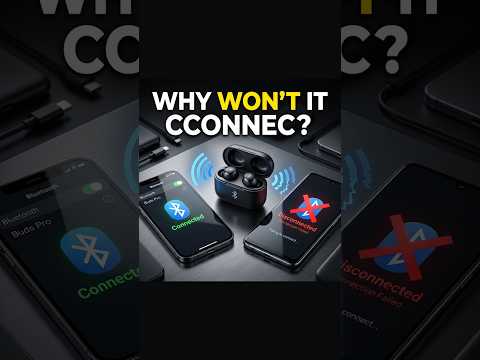
Why Bluetooth Works on One Phone but Not Another! 📱🔵
Have you ever connected the same Bluetooth earbuds, headphones, speaker, car system, or other wireless device to one phone successfully, only to discover that it doesn’t work on another phone? This can be confusing, but it doesn’t necessarily mean that your Bluetooth device is broken.
In this Short, you’ll learn why Bluetooth works on one phone but not another and what can cause Bluetooth compatibility and connection problems between different smartphones.
Bluetooth devices communicate using short-range radio signals, but not every phone has exactly the same Bluetooth hardware, software, supported features, or Bluetooth version. Different phones can support different Bluetooth capabilities, and those differences can sometimes affect compatibility.
One important factor is the Bluetooth version. Newer smartphones may support newer Bluetooth features, while older phones may have different capabilities. Bluetooth is designed with backward compatibility in many situations, but compatibility doesn’t always mean that every feature will work identically on every device.
Another potential reason is software. Your phone’s operating system, Bluetooth drivers, firmware, and the software running on the Bluetooth accessory can all influence whether the devices connect correctly.
That’s why keeping both your phone and Bluetooth device updated is an important troubleshooting step. If a software update is available, installing it may resolve bugs, improve compatibility, or improve connection stability.
Wireless interference can also cause problems. Bluetooth uses radio frequencies that can become crowded around other wireless devices. If you’re testing Bluetooth in an environment with many connected devices, try moving the phone and Bluetooth accessory closer together and away from unnecessary sources of interference.
🔵 Quick Bluetooth Troubleshooting:
📱 Update both phones
🔄 Turn Bluetooth off and back on
⚙️ Forget the Bluetooth device
🎧 Put the accessory back into pairing mode
📡 Keep the devices close together
🚫 Reduce possible wireless interference
🔄 Pair the devices again
These steps can help troubleshoot Bluetooth works on one phone but not another, Bluetooth compatibility problems, Bluetooth connection issues, Bluetooth pairing problems, Bluetooth not connecting, wireless device problems, Bluetooth earbuds problems, smartphone Bluetooth problems, and Bluetooth troubleshooting.
Another factor can be Bluetooth profiles and codecs. A phone and Bluetooth accessory may support different audio profiles or codecs, which can affect certain features. A device might connect successfully but offer different functionality depending on the phone.
If your Bluetooth accessory works on one phone but not another, try testing both phones under the same conditions. Keep the Bluetooth device nearby, make sure it’s charged, and remove unnecessary paired devices if possible.
You should also check whether the Bluetooth accessory is already connected to another nearby phone, tablet, laptop, or computer. Some Bluetooth devices automatically reconnect to a previously paired device, which can prevent a new phone from connecting.
If necessary, use the phone’s Forget Device or Unpair option and then put the Bluetooth accessory into pairing mode again.
It’s also useful to remember that Bluetooth compatibility is not determined only by whether both devices have Bluetooth. Hardware, software, supported profiles, Bluetooth versions, firmware, codecs, and manufacturer-specific implementations can all influence the final connection experience.
If Bluetooth still doesn’t work on the second phone after troubleshooting, the issue could be related to the phone’s Bluetooth hardware, operating system, compatibility limitations, or a specific software problem.
Before assuming your Bluetooth earbuds, headphones, or speaker is defective, test the device with another compatible phone and compare the results.
Watch this Short to understand why Bluetooth works on one phone but not another, and try these troubleshooting steps the next time you encounter a Bluetooth connection problem.
If this video helped you, LIKE 👍, SUBSCRIBE 🔔, and SHARE it with someone struggling with Bluetooth compatibility!
For more practical technology solutions, follow for Bluetooth tips, smartphone troubleshooting, WiFi fixes, wireless audio solutions, PC connectivity tips, device troubleshooting, and everyday tech hacks. ⚡
#Bluetooth #BluetoothFix #BluetoothProblems #BluetoothTips #BluetoothConnection #BluetoothTroubleshooting #SmartphoneTips #PhoneTips #AndroidTips #iPhoneTips #WirelessDevices #WirelessAudio #Earbuds #TechTips #TechFix #Troubleshooting #Technology #Shorts AQH0RAGGLNSCLPO0

Be the first to comment